
Case study · Google Ads on a limited budget
How We Made This Home Service Client More Than $5,000 in One Month With Google Ads, on a Limited Budget
A small home service business in Texas gave us one month and a limited budget, less than $50 a day, to prove Google Ads could bring in real work. We built it all from scratch. By week four, each call or quote request cost 35% less than in week one, down from more than $50 to about $33. The owners counted about 10 new customers, worth more than $5,000. That is just under $150 in ads for each new customer. Then they signed on for a second month.
No contract. No exit fee. Your domain and Google accounts stay in your name.

The owners install equipment at homes and businesses, and they do the work themselves. Their work was good. Their phone was too quiet.
They had a small budget and no room to waste it. So they gave us one month to show them Google Ads was worth it. We are not naming them, because these are their own sales numbers. We rounded the money figures. Everything else is exactly what happened.
What did this home service business need from Google Ads?
Calls from people ready to hire. Not clicks from people who are just curious.
On a limited budget, that matters even more. In their trade, lots of searches come from do-it-yourself people. They want a how-to video, not an installer. Every one of those clicks costs money and never turns into a job. So we set one rule: spend only on people ready to hire, and make it easy for them to call.
How did we set up Google Ads for a home service business?
We built it from scratch, around the jobs the owners actually want. And we set up tracking before the first ad ran.
- Show up only when someone asks. The ads appear when a person types what they need into Google. No banner ads chasing people around the internet.
- Pay only for buyers. We picked searches from people who want the job done for them, in the areas the owners serve. Do-it-yourself searches were shut out from day one.
- A page for every ad. Each ad leads to a page about that exact job, with a call button and a short quote form near the top.
- Count what counts. Calls, texts, emails and quote forms are all tracked. So Google learns from real people asking for work, not from clicks.
How did the cost per conversion change week by week?
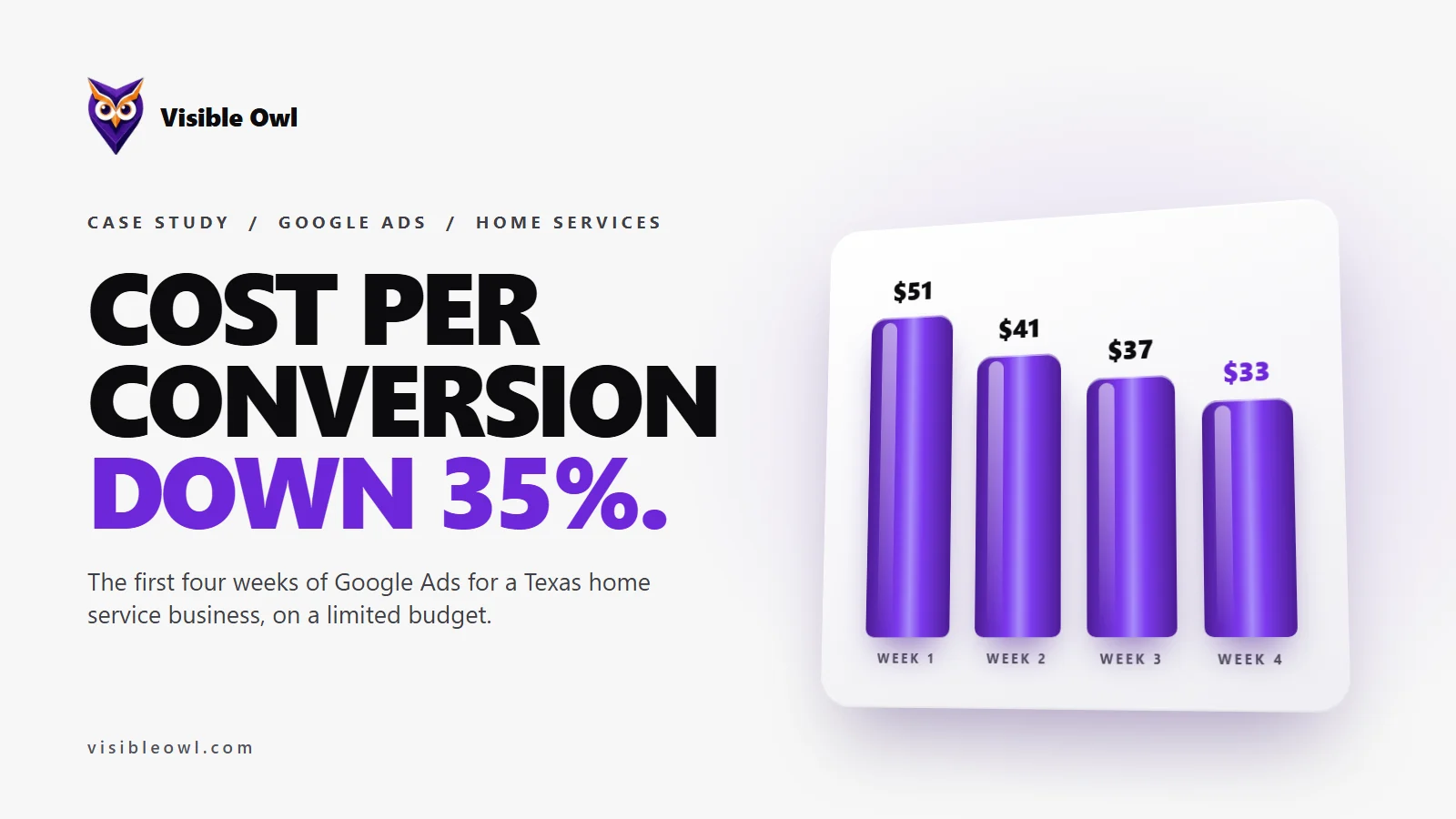
It dropped every full week, and ended 35% lower. Each conversion cost more than $50 in week one and about $33 in week four. At the same time, the number of conversions almost doubled, from 6 to 11.
- Week 1 · 68 clicks, 6 conversions$51
- Week 2 · 64 clicks, 8 conversions$41
- Week 3 · 61 clicks, 9 conversions$37
- Week 4 · 69 clicks, 11 conversions$33
There was no single trick. Each week we read the real searches people typed, and shut out the ones that would never become a job. We reined in searches that cost too much, and dropped the ones that never brought a call. We sharpened the call buttons and extra links on the ads. And we put the money into the hours when people actually called.
What were the results after the first 30 days?
Here is the whole first month, straight from Google Ads. The full month of ads cost just under $1,500, and each conversion cost about $40 on average.
- 285clicks, from 1,403 times the ads were shown
- 36calls, texts, emails and quote forms, all tracked
- 35%lower cost per conversion, week one to week four
- ~$50a day in ads, under $1,500 for the whole month
Then the part that matters most. Four weeks in, the owners told us they had won about 10 new customers from these calls and forms, worth more than $5,000. That is more than three times what they put into ads, and just under $150 for each new customer.
Two honest notes. The customer and sales numbers are the owners’ own count, not an audit. And not every conversion is a new customer, because one person might call and also fill in a form.
Which leads were better: phone calls or quote forms?
Phone calls. The owners told us callers were more ready to book than people who filled in a form.
That fits where the clicks came from. 279 of the 285 clicks came from phones. So month two leans harder on calls than on forms.
Why did they stay for a second month?
Because it worked, and they could see it working. They came for one month, with everything in their own name and nothing stopping them from walking away.
They stayed. Each week cost less than the last, the phone was ringing with real jobs, and they could check every number for themselves. We also keep their website updated whenever they ask.
How can a home service business make Google Ads work on a limited budget?
Spend only on people ready to hire, and cut everything else fast. Most of what worked here is not a secret. You can do it yourself:
- Block do-it-yourself searches before they eat your budget.
- Send each ad to a matching page with the phone number at the top.
- Track calls, not just clicks, so you know which searches bring jobs.
- Check the real searches every week, and cut what does not work.
- Write down which calls became paying jobs. Your own records beat any dashboard.
Our step-by-step guide shows you how: how to run Google Ads yourself, without an agency. If you would rather hand it over, see how we run Google Ads for local businesses, or what marketing for home service businesses looks like with us.
Where do these numbers come from?
The ad numbers come from the business’s own Google Ads account, for the campaign’s first 30 days: September 30 to October 29, 2026. The customer and sales numbers come from the owners’ email to us on October 27, 2026. We rounded every money figure.
We left out the business’s name and its exact trade, because these are its private sales figures.
Questions about this case study
How much did Google Ads cost this home service business?
Just under $1,500 in ads for the first month, or less than $50 a day. That brought 36 tracked calls, texts, emails and quote forms, at about $40 each. By the owners’ count it also brought about 10 new customers, so each one cost just under $150 in ads.
Can Google Ads work on a limited budget?
Yes, if every dollar goes to people ready to hire. This business spent less than $50 a day. What made it work was shutting out curious searches, sending each ad to a matching page, and checking the real searches every week.
How fast did the Google Ads start working?
The first conversions came in week one. The cost per conversion then fell every full week for a month, as we cut wasted searches and moved the money to what worked.
Is about $40 per conversion good for a home service business?
For this business, yes, because about 10 paying jobs came from it. For a benchmark, LocaliQ puts the national average for home and home improvement at about $91 a lead. What counts as good depends on what a job is worth to you.
What counts as a conversion in Google Ads?
Any action you tell Google to count. Here it was a call, a text, an email or a quote form from someone who clicked an ad. Not every conversion is a new customer, so we also ask owners which calls turned into paying jobs.
Could I get results like this running Google Ads myself?
You can do a lot of it yourself. Our guide to running Google Ads without an agency walks through the same steps: tracking, buying searches, blocked searches and matching pages.
Abdullah Mahdi
Founder of Visible Owl. Leads SEO, AI search (GEO and AEO) and website development, and has built and ranked websites for small businesses since 2015.
Sources
Want more answers like this?
Add Visible Owl as a preferred source on Google, and our articles show up more often in your Top Stories and AI answers.
Button not showing? Add Visible Owl on Google.